
Upload vs index: how AI reads your documents
Americans spend a quarter of their workweek hunting for documents. AI tools can fix that, but only if you pick the right way to feed them your files. Direct upload vs RAG.


Jason Kamara
February 13, 2025 · 7 min read
Employed Americans spend on average 25% of their workweek, that is two full hours every day, searching for documents, information, or people they need to do their jobs. For a 50-person company, that translates to roughly $1.25 million in annual salary spent just looking for answers.
This is not just an efficiency problem. When businesses cannot quickly access their documented knowledge, the ripple effects impact every aspect of operations. Customer response times suffer. Opportunities get missed. Errors creep into deliverables. Teams waste time reinventing the wheel. And perhaps most dangerously, critical decisions get made using outdated information.
AI chat applications promise to solve these problems by making your business documents instantly searchable and accessible. Tools like Claude and Perplexity.ai (and with more effort, ChatGPT) can analyze documents, answer questions, and even help draft new content. But there is a crucial choice to make first: how should your AI tool interact with your documents?
Understanding the difference between RAG (Retrieval-Augmented Generation) and direct document processing is not just technical trivia. It is the key to successfully modernizing your document workflows. Let us explore which approach makes sense for your business.
AI document processing: two methods
Before diving into complex AI implementations, it is essential to understand the two fundamental ways AI can work with your documents. Each method serves different business needs, and knowing when to use each one will save you significant time and resources. Let us explore these approaches through common business challenges and their solutions.
Deep document analysis with direct document processing
Challenge: “I need to thoroughly analyze specific documents.”
Solution: direct document processing.
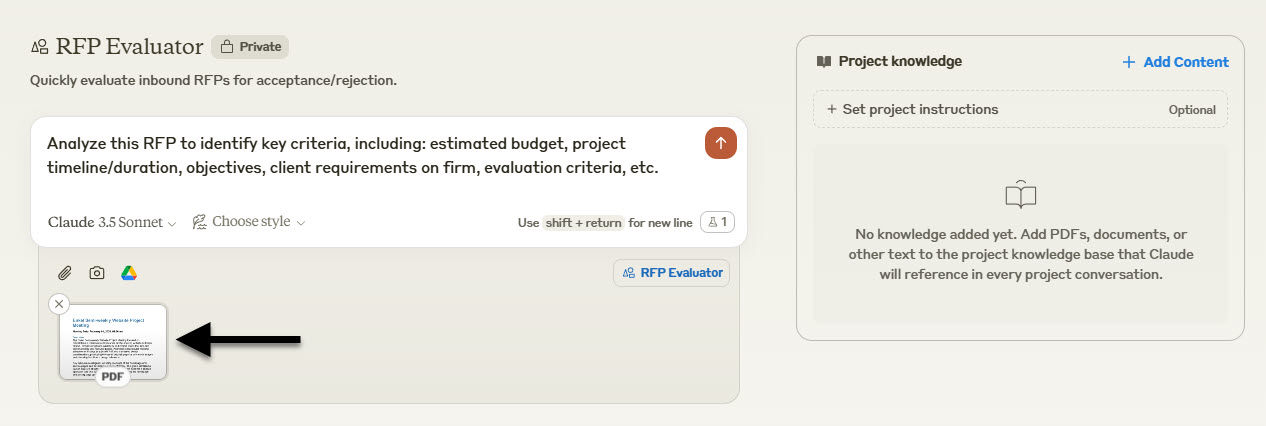
- Upload your document directly to Claude, Perplexity.ai, or ChatGPT.
- AI reads the entire document at once as part of the conversation.
- Full context available, but limited by maximum document size.
- Perfect for contracts, reports, or any document needing detailed review.
- Example: analyzing a 30-page RFP with Claude Sonnet to identify key requirements and deadlines.
Cross-document intelligence with RAG
Challenge: “I need to access information across multiple documents.”
Solution: RAG (Retrieval-Augmented Generation).
- Documents are broken into smaller, meaningful chunks.
- Each chunk is converted into a mathematical representation (embedding).
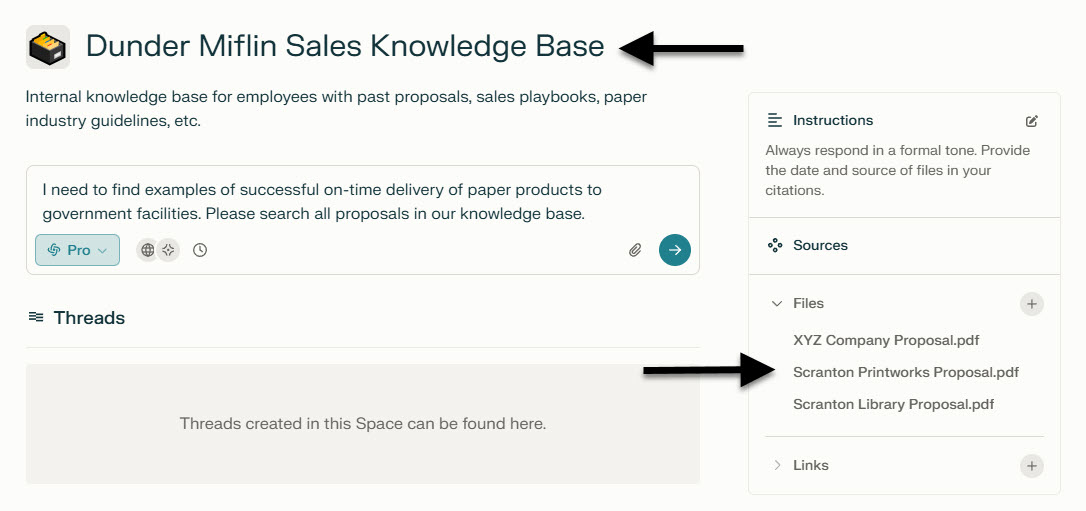
- AI finds and retrieves the most relevant chunks when answering questions.
- Ideal for maintaining consistent answers across your organization.
- Example: Perplexity.ai searching across your entire proposal library to find relevant past work.
Combining both approaches
The best part? These approaches are not mutually exclusive. Platforms like Claude, Perplexity.ai, and ChatGPT (via CustomGPTs) combine both methods, giving you the flexibility to switch between deep document analysis and broad knowledge retrieval as needed.
Choosing your document processing method
Perfect for direct upload
- Legal documents: contracts, NDAs, regulatory filings.
- Financial reports: annual reports, audits, tax documents.
- Technical documents: product specs, research papers.
- Client deliverables: proposals, SoWs, project plans.
Ideal for RAG
- Knowledge base articles: FAQs, procedures, policies.
- Sales materials: case studies, pricing guides, proposals.
- Training content: courses, manuals, best practices.
- Industry guides: tax codes, compliance regulations, style guides.
Understanding the impact
The way each method processes documents directly affects their performance. Direct upload is like having someone read an entire book before answering questions. They have full context but can only handle so much at once. RAG, on the other hand, is like having a librarian who has organized all your books by topic and can instantly pull relevant chapters from multiple sources.
This fundamental difference affects several key factors:
- Processing speed: RAG typically handles large document sets faster.
- Answer accuracy: direct upload excels at nuanced analysis, while RAG is better for fact-based queries.
- Scalability: RAG grows more efficiently with your document library.
- Context understanding: direct upload maintains better contextual awareness within a single document.
Implementation considerations
- Data security: direct upload for single-use sensitive documents.
- Update frequency: RAG for frequently changing information.
- Access patterns: direct upload for deep analysis, RAG for quick reference.
- Scale: RAG becomes more valuable as your document library grows.
Making your decision
Start with your most pressing need, but plan for growth. Many businesses begin with direct upload for immediate document analysis needs, then expand to RAG as their document library grows.
Tips for optimal AI document processing
Successfully implementing AI document processing does not have to be complicated. Whether you are using direct upload or RAG, following these best practices will help you get the most accurate and reliable results from your AI tools.
Preparing your documents
- Convert all files to searchable PDF, text, or CSV formats.
- Ensure clean, properly formatted text.
- Remove unnecessary headers, footers, and watermarks.
- Break large documents into logical sections.
Best practices for direct upload
- Chunk large documents into 20 to 25 page segments.
- Use clear, specific questions.
- Start with broad questions, then get specific.
- Verify key findings with follow-up questions.
Best practices for RAG
- Organize documents by topic before uploading.
- Create clear naming conventions.
- Update documents regularly to maintain accuracy.
- Remove outdated versions to prevent confusion.
Common pitfalls to avoid
- Overloading with irrelevant documents.
- Asking vague or overly complex questions.
- Neglecting regular knowledge base updates.
- Failing to validate AI responses.
AI document processing: real business impact
The impact of AI document processing extends far beyond simple efficiency gains. Teams are uncovering insights that were previously buried in thousands of pages of documentation. They are responding to time-sensitive requests with unprecedented speed and accuracy. Most importantly, they are maintaining complete control over their information while dramatically reducing processing time.
This transformation is happening across every industry and business function. From proposal development to market analysis, from compliance reviews to strategic planning, organizations are discovering new ways to leverage their documented knowledge. The barriers to entry are lower than ever, and the benefits are immediate and measurable.
Ready to put these methods to work on your own document library? Build a workspace where your team can upload, organize, and query the knowledge that already lives in your business. Create a free account and start working more productively with your business data.
Found this useful?
Share