
Basic AI prompt cheat sheet for everyday business tasks
A generic AI answer is not the tool failing you, it is the prompt failing the tool. Five techniques you can apply today to get sharper responses from ChatGPT, Claude, or Gemini.


Jason Kamara
April 30, 2025 · 7 min read
You have been there. You ask ChatGPT a question, hoping for that perfect response to help with your latest business challenge. Instead, you get a generic answer that misses the mark completely. Maybe it is too basic, filled with fluff, or worse: it contains fabricated information presented as fact.
What if you could transform those disappointing AI interactions into consistently helpful, accurate responses? The difference is not in the AI tool itself. It is in how you ask the question.
According to ADDRC, business users who master basic prompting techniques can reduce their editing time by up to 70% and dramatically improve the relevance of AI outputs. Yet most professionals are still using these powerful tools at just a fraction of their capability.
In this guide, I will share our beginner-friendly AI prompt cheat sheet designed specifically for everyday business tasks. Whether you are using ChatGPT, Claude, or Google Gemini, these five prompting techniques will help you get clearer, more accurate, and more useful responses without needing to become an AI expert.
Why most business users struggle with AI
Let us be honest: most of us are not getting what we should from AI tools. The gap between what these systems can do and what the average business user actually gets is substantial.
The problem
Most users treat AI like a search engine rather than a collaborative partner that needs proper guidance. We input short, vague queries and expect perfect results.
Common mistakes
- Vague instructions without specific parameters.
- Missing context about your business, audience, or goals.
- Unspecified format requirements.
- No iteration or refinement of initial prompts.
The real-world impact
Poor prompting creates two major headaches. First, hallucinations occur when the AI fills in your knowledge gaps with plausible-sounding but incorrect information. Second, you get “AI slop,” generic, templated content that clearly came from a machine and lacks your brand’s distinctive voice.
The good news? With just a few simple prompting techniques, you can transform your AI interactions from frustrating to fantastic.
Five essential prompting techniques every business user should know
The difference between mediocre and exceptional AI results often comes down to how you frame your requests. Here are five practical prompting techniques that form our essential AI prompt cheat sheet for business users.
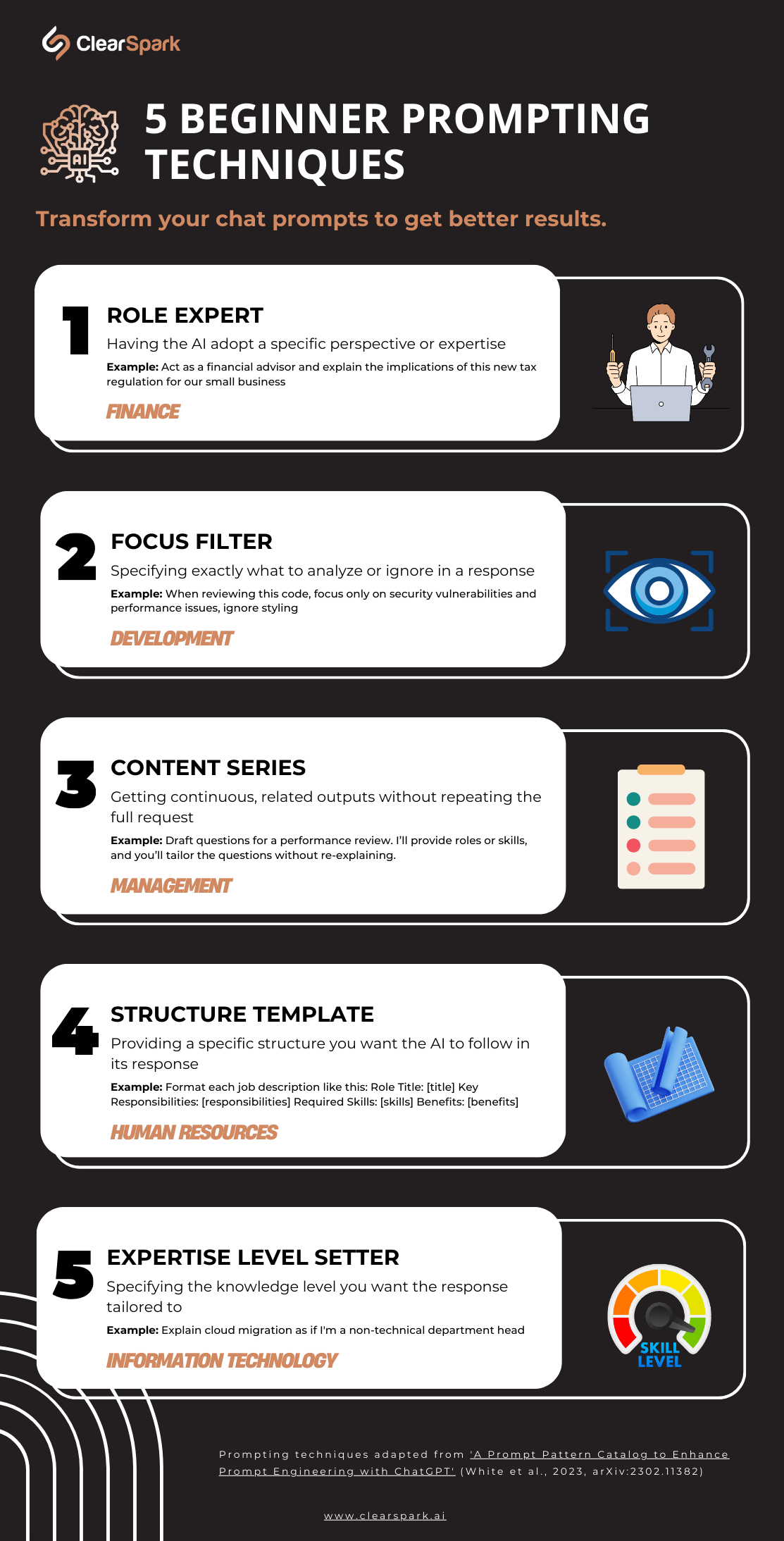
Technique 1: Role Expert
What it is: having the AI adopt a specific perspective or expertise.
Business impact: more authoritative, specialized responses tailored to your industry.
How to use it:
Act as a [specific professional role] with expertise in [relevant specialty].Then state your request.
Real-world application: instead of asking “How can we improve our email open rates?” try:
Act as an email marketing specialist with expertise in B2B technology companies. Suggest 5 subject line strategies to improve our open rates with IT decision-makers.Technique 2: Focus Filter
What it is: specifying exactly what to analyze or ignore in a response.
Business impact: more relevant insights without information overload.
How to use it:
Analyze/Review [content] focusing specifically on [aspects].
Ignore or exclude [irrelevant aspects].Real-world application: instead of “Review this sales call,” try:
Review this sales call transcript focusing only on objection handling techniques and missed opportunities. Ignore discussion of pricing and technical specifications.Technique 3: Content Series
What it is: getting continuous, related outputs without repeating the full request each time.
Business impact: save time by generating variations without repetitive prompting.
How to use it:
Create [number] different [content type] about [topic].
Vary each one by [differentiating factor].Real-world application: instead of repeatedly entering the same instructions, try:
Draft LinkedIn shares for each blog post. I'll share the URL for each article, then you can analyze the post and draft the LinkedIn share.Technique 4: Structure Template
What it is: providing a specific structure you want the AI to follow in its response.
Business impact: receive information in immediately usable formats that match your workflow.
How to use it:
Create [content] using this exact structure:
- [Section 1]
- [Section 2]
- [Section 3]Real-world application: instead of “Write a project brief,” try:
Create a project brief with exactly these sections:
- Project Overview (2 sentences)
- Business Objectives (3 bullet points)
- Target Audience (1 paragraph)
- Key Deliverables (5 bullet points)
- Timeline (list of 4 milestones with dates)
- Success Metrics (3 bullet points)Technique 5: Expertise Level Setter
What it is: specifying the knowledge level you want the response tailored to.
Business impact: content that matches your audience’s understanding, reducing friction and confusion.
How to use it:
Explain [topic] at a [knowledge level] appropriate for [audience].Instead of “Explain our new data security protocol,” try:
Explain our new data security protocol at a basic level appropriate for sales team members who need to address client concerns without diving into technical implementation details.Each of these techniques addresses a specific challenge in business AI interactions. Use them individually for simple tasks or combine them for more complex projects. The more specific your prompts, the more valuable your AI outputs will be. For a comprehensive list of research-backed prompting techniques, review this publication from arXiv.
Putting it all together: combining techniques for superior results
While each prompting technique is powerful on its own, the real magic happens when you combine them. Think of our AI prompt cheat sheet as a toolbox where different techniques can work together to unlock the full potential of AI for your specific business needs.
Example: the triple-technique super prompt
Let us see how combining three techniques (Role Expert, Structure Template, and Expertise Level Setter) creates a powerfully specific prompt:
Act as a financial controller with expertise in retail operations.
Review these quarterly numbers and provide analysis in this exact format:
- Key Performance Indicators (3 bullet points)
- Concerning Trends (2-3 sentences)
- Recommended Actions (4 bullet points in priority order)
Write your analysis at a mid-management level, assuming familiarity with basic financial terms but not advanced accounting concepts.This combined approach ensures you get:
- Expert financial analysis (Role Expert).
- In exactly the format you need (Structure Template).
- At the right complexity level for your audience (Expertise Level).
When to keep it simple vs. go complex
Not every task requires a complex, multi-technique prompt. Use this simple decision framework:
- Simple technique: quick tasks with clear parameters (e.g., “Act as a proofreader and fix grammar issues in this email”).
- Combined techniques: complex tasks requiring specialized knowledge in specific formats (e.g., financial analysis, marketing strategy development, technical documentation).
Remember that effective prompting is iterative. Start with your best combination of techniques, evaluate the results, and refine as needed. This approach will consistently deliver superior results compared to basic prompting.
Common business tasks transformed with better prompts
Let us explore how applying our prompting techniques transforms common business activities from frustrating to productive. These examples show how to approach each task step by step while preventing common AI problems like hallucinations and generic content.
Email drafting and responses
Challenge: generic emails that sound robotic or inauthentic.
Solution: combine Role Expert, Structure Template, and Expertise Level.
Act as our customer success lead with a focus on retention.
Draft an email to a customer who has expressed concerns about our recent price increase.
Structure the email with:
- Empathetic acknowledgment of their concern
- Clear explanation of value added with the new pricing
- Specific offer (10% loyalty discount for 6 months)
- Simple next steps
Write in a tone that's professional but warm, appropriate for a 3-year customer relationship.Why it works: this approach keeps the AI focused on the specific scenario and information you have provided, rather than inventing details. It also creates distinctive, personalized content by specifying the exact voice and relationship context.
Data analysis and reporting
Challenge: surface-level summaries that miss what actually matters in the numbers.
Solution: combine Role Expert, Focus Filter, and Structure Template.
Act as a business intelligence analyst with retail industry expertise.
Analyze this Q2 sales data focusing exclusively on:
- Regional performance variations
- Product category trends
- Customer segment shifts
Present your analysis in this exact format:
1. Executive Summary (3 bullet points maximum)
2. Key Findings (5 findings with supporting data)
3. Strategic Implications (3 business impacts)
4. Recommended Actions (3 prioritized steps)
Include only insights directly supported by the data provided.Why it works: the structured approach prevents the AI from wandering into speculative territory where factual errors occur. The explicit instruction to include “only insights directly supported by the data” creates a further guardrail against unfounded conclusions.
Meeting summaries and action items
Challenge: important details missed or fabricated information added.
Solution: combine Structure Template, Focus Filter, and Expertise Level.
Create a meeting summary from this transcript using this exact structure:
- Decisions Made (bulleted list)
- Action Items (with owner and deadline)
- Key Discussion Points (maximum 3)
- Next Steps
Focus only on confirmed decisions and explicit commitments. Exclude hypothetical discussions and preliminary ideas.
Write at a level appropriate for team members who missed the meeting but need to quickly understand outcomes and their responsibilities.Why it works: the structured approach with specific filtering instructions helps prevent the AI from “filling in gaps” with assumptions or including unimportant details. The expertise level ensures the summary serves its exact purpose.
By applying these techniques to your everyday business tasks, you will not only save time but also get consistently useful, accurate results that require minimal editing.
Take your prompting skills to the next level
Now that you have these essential techniques, it is time to put them into practice and develop your prompt engineering skills. The real power comes from consistent application and refinement.
Your next steps:
- Download the cheat sheet for quick reference during your workday.
- Start simple by applying one technique to a task today.
- Build gradually by combining techniques for more complex tasks.
- Create a library of your most effective prompts for repeated use.
To accelerate your progress, the ClearSpark AI Adoption Hub gives you two tools that work hand in hand. The Prompt Enhancer turns your rough first drafts into stronger prompts by applying the techniques in this guide for you. The Prompt Library is where those prompts become durable: save the ones that work, customize them for your team, share them across the organization, and pull from a growing set of ClearSpark-curated prompts built for common business tasks.
- Enhanced prompting from your basic input, drawing on 20+ academically developed prompting techniques.
- A personal and team prompt library so the prompts that work stop living in scattered chat windows.
- ClearSpark-curated prompts you can adopt as-is or customize for your business.
The goal is not just better prompts today, it is developing intuitive skills that become second nature. Create a free account and try the Prompt Enhancer and Prompt Library.
Found this useful?
Share